Copenhagen Atomics flew me to Delft to capture a day's worth of thorium lectures and their for-sale 40L Molten Salt Loop being demonstrated.
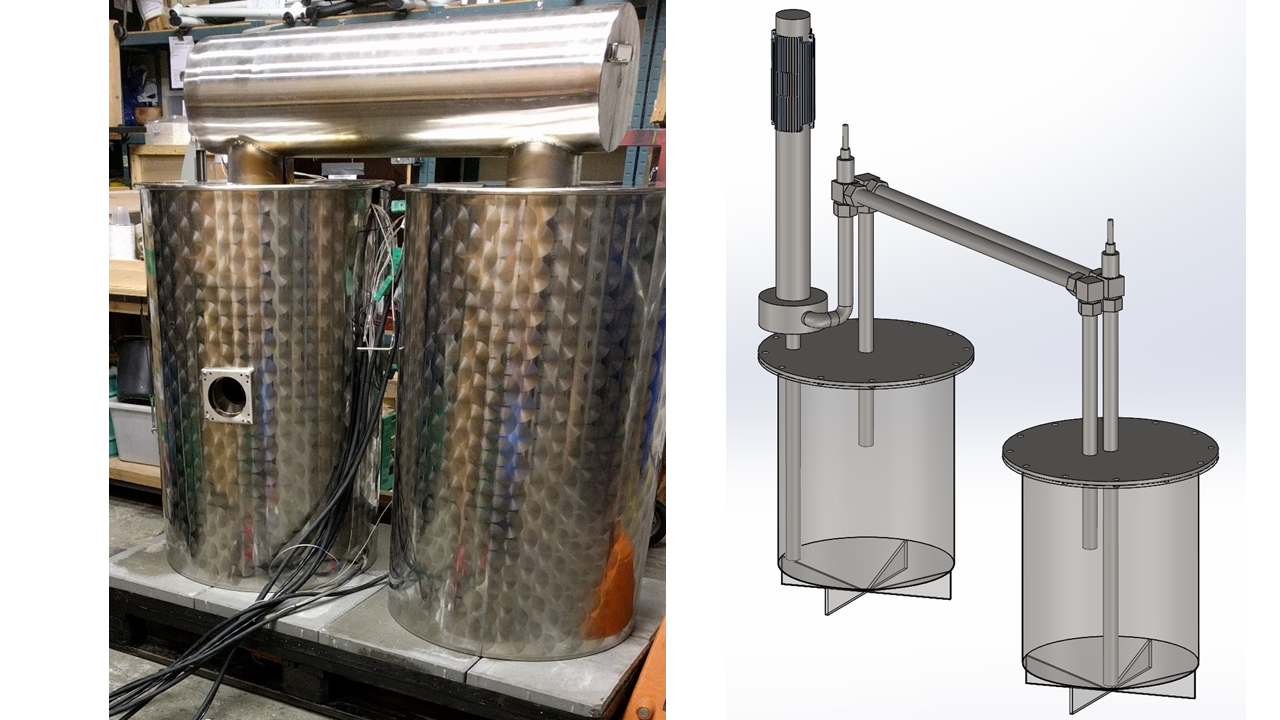
The salt loop is being used internally by Copenhagen Atomics to test their Laser Induced Breakdown Spectroscopy system with molten salts.
This was part of a day-long series of talks held at Buccaneer Delft, an energy solutions incubator in Netherlands. http://buccaneerdelft.com/event/thorium-molten-salt-reactors-with-on-site-demonstration/
I'm still have a bit of the Delft footage to process, and then I'll take a look at releasing the rest of it in the most useful fashion. But Copenhagen Atomics has immediate need of an edited video, so this represents what I was able to put together by Jan 30th.
It is also the first 4K render I've exported. I don't own a 4K TV myself, nor any device showing every 4K pixel. Although I can't imagine noticing such detail... even my (rather large) PC monitors are 2560x1440 not nearly 3840x2160 (4K).
But I did upgrade my iPhone.. from a 5s (1080P camera) to 8+ (4K camera). So I wanted to see what the workflow would be like, if my PC could handle it, etc. Maybe YouTube cares for search-result-optimization purposes? No idea. Trying it to find out.
PPro 2018-1
The iPhone8+ upgrade and shot footage has also now forced me to install the very latest Premiere Pro... I basically could not keep the iPhone footage audio/video in sync without (lossy) transcoding. The ability to natively handle iPhone footage natively is a long-overdue and just-released feature of PPro.
I'm still figuring out how stable PPro 2018-1 is. If I need to roll back to an earlier version, this wouldn't be the first time.
So this represents the first capture and workflow since TEAC8... the "straw that broke the camel's back" conference in terms of Gord-vs-hardware.
2012 (Non-Retina) MacBook Pro
Aside from my iPhone 5s debacle at TEAC8, I also experienced laptop shame as I tried to plug my Dad's (borrowed) PC laptop into the project. It had no VGA port, so at TEAC8 I was the idiot unable to do a demo.
(This is not me criticizing laptops without VGA ports... once can always address such a problem, it was just I never realized his laptop had no VGA port so didn't bring an adapter with me.)
I never bought a modern laptop because I never found one that met all my needs...
1. MacOS compatibility (to run X-Code for Thorium app).
2. Massive internal storage (to suck up video at conferences).
3. USB3 and SD card slot to quickly copy video files.
3. i7 (to edit on-the-go now including 4K off iPhone).
4. Backlit keyboard (work if a kid sleeping on couch).
5. Big enough display to edit with PPro.
...of all those bullet points, if you know anything about Apple laptops, #2 probably stuck out to you as sounding the alarm bells.
How much do you think it would cost to spec out a new Apple MacBook with 4TB of storage?
Spending $3,800 USD does NOT get one 4TB. It gets 2TB.
There is NO WAY to get 4TB of internal storage.
Not to mention $3,800 USD is just nuts.
So I finally bit-the-bullet and bought a laptop to replace my 2009 MacBook which was maxed at 6GB RAM and too old to run latest MacOS or X-Code, and lacking USB3. (Lack of USB3 is why I never brought it to a TEAC... makes it a terrible video footage vacuum.)
Behold: https://support.apple.com/kb/sp694?locale=en_US
From my video-editing perspective, the best Apple laptop one can buy today was made in 2012.
Cost me (well.. you) $1,000 USD.
This covered everything... the cost of the laptop (off eBay), 2x 2TB 2.5" SSHD Firecuda, and an iFixit kit to tear out the optical drive and replace it with one of the 2.5" SATA SSHD.
I go-on about this particular laptop because it is worth pointing out ONLY the 2012-non-retina model has both USB3 and 2.5" SATA. In 2011 Apple had no USB3 ports, by 2013 they'd gone completely (expensive and non-upgradeable) flash-storage. So just that one year of just this one model.
4TB internal storage. I'm running both MacOS and Windows 10. Reasonable 1680x1050 15" display. Can jam 16GB of RAM into it (despite Apple's claim it only supports 8GB of RAM).
So, if you're wondering where your money goes... that's where $1,000 went.