Crazy time and computer issues caused this delay in progress. Will detail below under "Boring Details".
IMSR / Terrestrial Energy / Dr. David LeBlanc
https://www.youtube.com/watch?v=-MIypP_uBSA
Unintended Consequences (a book by) George Erickson
https://www.youtube.com/watch?v=pKax_3-Wkzs
Nuclear Innovation Strategies - Magdi Ragheb
https://www.youtube.com/watch?v=dhbhj9BbsHI
Radiation Limits to Innovation - Dr. Robert Hargraves
https://www.youtube.com/watch?v=MCtVH4k6lNk
YouTube Monetization
As I sometimes do, I've turned on Ads on a couple videos.
This is in response to the "Adpocalypse" which has demonetized many videos out there in YouTube-land, and also YouTube's raising-the-bar for who can run ads.
I'm assuming the higher the bar, the better it is for those who qualify.
The big question I'm always trying to answer when I do this is: Do videos with ads propagate more than those without?
Obviously it is in YouTube's financial advantage to do so, but I've never seen any indication before they do.
This time I left the ads on longer than before (they're still running) and on more popular videos than before. (2 videos.)
This nets me $150/month, which is not interesting. But I don't see any indication it is harming viewership... or increasing viewership. Unless the possible propagation effect is delayed by a week.
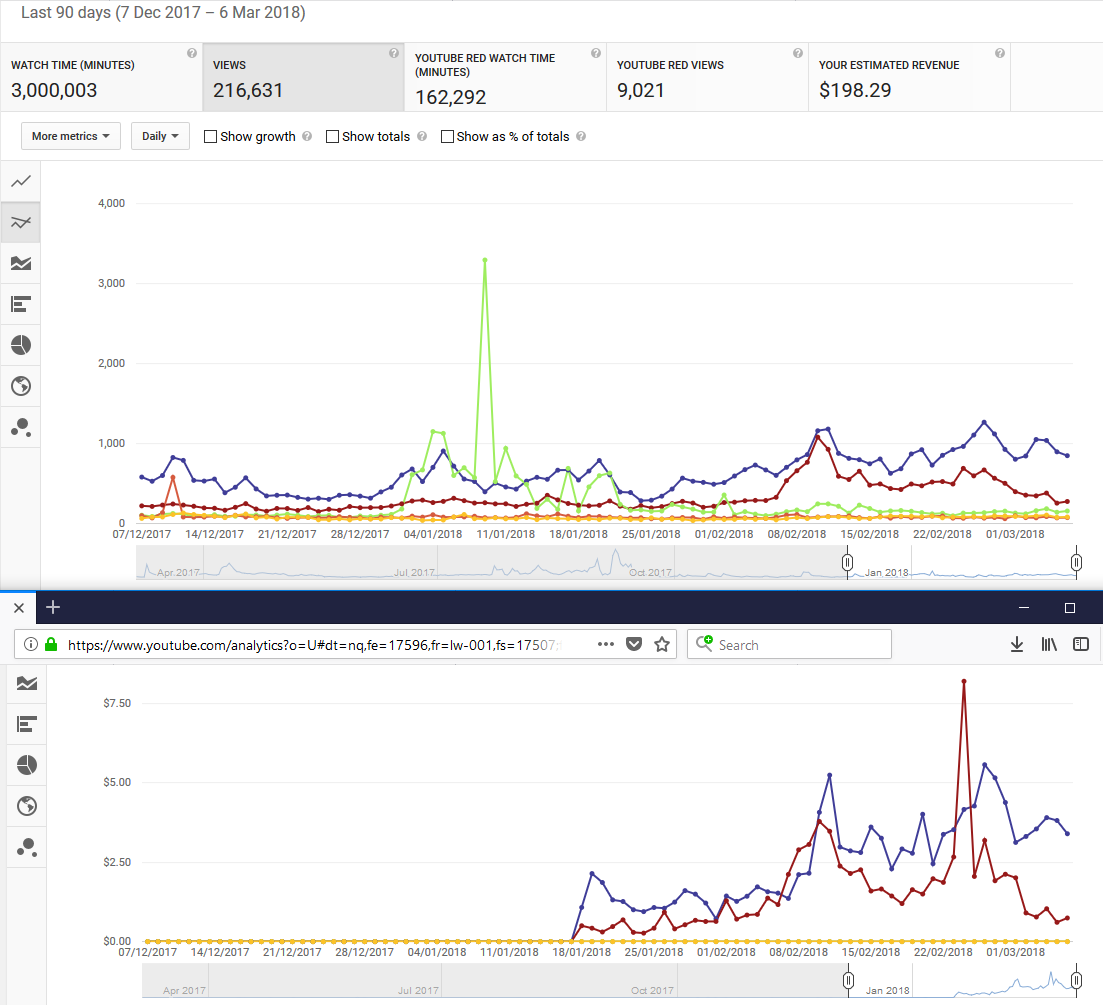
Blue is "Thorium Debunk" and red is "Thorium 2017".
This is completely inconclusive to me, maybe someone else can see something meaningful in it.
I'd guess the only really way to know for sure is to turn it on for 6 videos (include some unpopular ones) and cycle it off & on slowly (1 month cycles) for 3 of them and see if there's anything visually obvious.
Boring Details (my computer)
Presently, my computer will only boot when I temporarily move a jumper on the motherboard to reset the BIOS, then customize 4 settings before finally booting into Windows 10.
That is because I got a new graphics card, and (apparently) bumped or shorted something when installing it. I moved it around a lot between slots to try get PC to work.
That is because upon installing the new card, one of my monitors (my primary monitor) would show nothing-at-all until Windows 10 finished loading... my nicest monitor seemed to not-like old-school VGA as required by bootup sequence. In conjunction with this new video card anyway. Much hardware rejiggering happened before I figured this out, and changed the order of my monitors in the ports. Why did I get a new graphics card?
That is because my PC has been unstable on a number of fronts... basically since I bought it. In particular I've NEVER had any luck using my Quadro 4000 GPU. That WAS a really expensive card when I bought it... don't have price on-hand, but was real money.
Quadro 4000 only had 2GB of RAM. I've replaced it with a GeForce PNY 1080 Ti with 11GB RAM.
The new card cost $1,300 CAD (far less than the Quadro), but it is a "gaming" card not a "workstation" card. Think I made the right call on ditching "workstation" cards, in that I could afford this, and it has appeared to enable GPU rendering on my PC in PPro without weird errors and crashes.
Watching it render sequences, I see all 11GB are put to full use, so I'm guessing the 2GB Quadro just couldn't handle the load.
This helps my workflow... I'm rendering straight to H.264 instead of to uncompressed, and then compressing as 2nd step. (Which still takes longer but requires I start compression stage manually, and I'm never standing around to do that as soon as uncompressed is rendered.)
Why did I decide to get a new video card?
But also a hard drive was failing, and I thought it was time to re-think my data storage.
I'm still using almost every server-quality NAS drive from the drive-upgrade of 2016 (again, courtesty of Andrew Jaremko). But I'm NO LONGER USING RAID.
I've only-ever used RAID, to give me a single large virtual drive where EVERYTHING would reside. Well I've broken that up across multiple drive letters. This is so I can more accurately monitor which physical drive is failing. I shouldn't need to do that, but my old MediaSonic RAID enclosures just never facilitated easy monitoring of hardware.
My new drive enclosure is a 4-bay USB 3.1 10mbit/sec without RAID.
Getting THAT to work also wasted days... DAYS. It was all because of driver issues. Stayed home from "real work" for days just trying to troubleshoot the PC.
Am now owner of 3 PCI USB 3.1 cards. They all work. (Or none of them work... depending on the driver.)
In summary... everything is working perfectly EXCEPT i need to fiddle with BIOS every time I reboot. That's fine. I'll do that. I can do that for years, so long as everything else keeps working.
Other Videos
I've also sunk some time into other pro-nuclear videos. Nothing to show yet, but that's the other reason these TEAC8 videos were delayed.
Looking forward to sharing when done.